Do Smart Locks Need Wi-Fi? Three Remote-Access Paths Compared
· HomeTechPulse
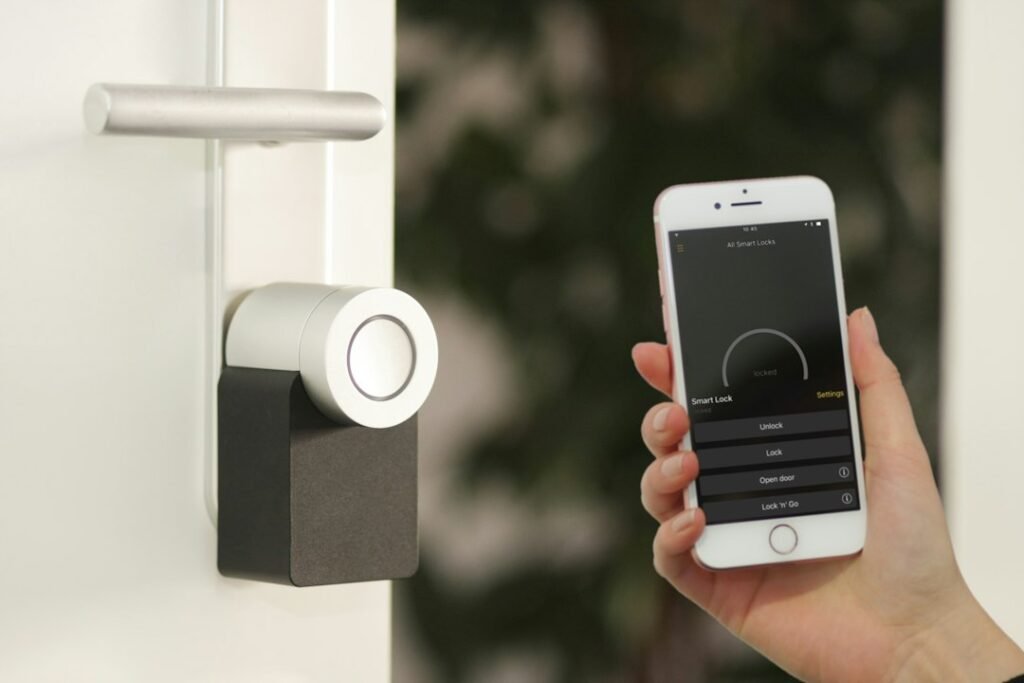
Short answer: a smart lock does not always need Wi-Fi to unlock your door, but it needs some path to the internet if you want to operate or monitor it while you are away. That path can be Wi-Fi built into the lock, a nearby hub that translates Zigbee or another local radio to the internet, or—in a local-only product—no remote-control path at all.
This documentation-based comparison looks at three exact models: the Schlage Encode Plus Smart WiFi Deadbolt, Aqara Smart Lock U100, and the original Wyze Lock Bolt (not Lock Bolt v2). It was checked against manufacturer documentation on October 16, 2026. It is not a hands-on review.
Start with the job you need the lock to do
“Works without Wi-Fi” can describe several very different outcomes. A keypad, fingerprint reader, physical key, NFC credential, or Apple home key may open a door while you are standing beside it. That does not prove that the lock can receive an unlock command from another city.
- Local entry: a person at the door unlocks with a code, fingerprint, key, phone, or watch.
- Remote status: the app reports whether the door is locked while you are away.
- Remote actuation: you can lock or unlock the deadbolt from away.
- Remote credential management: you can create, change, or revoke a code from away.
- Automation: another event can trigger a lock action, subject to the platform’s security rules.
Before buying, write down which of those five jobs you actually require. A product can support one and not another.
The four roles in a remote-access setup
| Role | What it does | Where it may live |
|---|---|---|
| End device | Moves or monitors the deadbolt | The smart lock itself |
| Local radio | Connects the lock nearby | Bluetooth, Zigbee, Thread, or Wi-Fi |
| Bridge or hub | Links a non-Wi-Fi lock to the home network | A separate Aqara hub or another supported bridge |
| Controller and service | Authorizes commands, apps, automations, and away access | Manufacturer app/cloud, Apple Home hub, or Matter controller |
A “hub” is therefore not automatically the same thing as a Matter controller, and neither term tells you which features survive without internet. Check the exact connection path, not just the logos on the box.
Three exact remote-access paths compared
| Model | Lock radio | Path for away control | Extra hardware | Important limit |
|---|---|---|---|---|
| Schlage Encode Plus | Built-in Wi-Fi; Bluetooth/NFC features also apply | Lock → home Wi-Fi → Schlage Home service → phone | No extra hub for Schlage Home remote access | Apple Home remote access and automations use a compatible Apple home hub |
| Aqara Smart Lock U100 | Bluetooth and Zigbee | Lock → compatible Aqara Zigbee 3.0 hub → network/service → phone | Aqara hub for Aqara remote features; an Apple home hub for Apple Home away features | Matter also requires a compatible Aqara hub and a Matter controller |
| Wyze Lock Bolt (original) | Bluetooth only | No general remote-actuation path | No supported gateway adds away control | App control and history require nearby Bluetooth; remote one-time-code generation is not remote unlock |
1. Schlage Encode Plus: Wi-Fi is inside the lock
The Encode Plus can connect directly to the home Wi-Fi network for control through the Schlage Home app. Schlage describes this as built-in Wi-Fi access without an additional accessory. If you instead want Apple Home to control the lock while away or include it in Home automations, Schlage says a compatible Apple home hub is required. See the Encode Plus product page and Schlage’s integration requirements.
Connection path: Encode Plus → Wi-Fi router → Schlage Home service → Schlage Home app.
Apple path: Encode Plus → Apple Home connection → compatible Apple home hub → Apple Home app while away.
Expected outcome: if Schlage Home works on cellular data with Wi-Fi disabled on your phone, the away path is operating. If Apple home key works at the door but Apple Home cannot control the lock away from home, check the Apple home hub path rather than assuming the lock’s NFC credential is broken.
2. Aqara U100: the hub is the network translator
The U100 is not a direct-Wi-Fi lock. Aqara’s official page says an Aqara Zigbee 3.0 hub is required for features such as Aqara automations, remote unlocking, and Matter support. It separately notes that Apple Home remote unlocking and HomeKit automations require an Apple home hub. Matter requires both a Matter-compatible Aqara hub and a Matter controller. Those are separate roles even when one piece of hardware can perform more than one of them. See Aqara’s U100 requirements and footnotes.
Aqara path: U100 → Zigbee → compatible Aqara hub → network/service → Aqara Home app.
Matter path: U100 → compatible Aqara hub/bridge → Matter fabric → Matter controller → chosen ecosystem app.
Expected outcome: the lock can still provide supported local entry methods at the door, while away features depend on the relevant hub path. If remote unlock is missing, first confirm which app you are using; the required hub differs between Aqara Home and Apple Home.
3. Original Wyze Lock Bolt: local-only by design
Wyze documents the original Lock Bolt as Bluetooth-only. Its app access is local, it does not use the Wyze Lock Gateway, and it does not support Wyze automations or Alexa/Google control. Configuration and history sync require the phone to be within Bluetooth range; Wyze’s setup guide specifies 16 feet or less during pairing. See Wyze’s pages on Wi-Fi support, feature differences, and the setup sequence.
There is one subtle exception: Wyze says the app can generate a time-limited one-time code away from the lock. The code is entered locally on the keypad; the phone is not remotely actuating the deadbolt. That makes it useful for emergency guest access, but it should not be mistaken for live remote lock/unlock. The exact distinction appears in Wyze’s Lock Bolt feature documentation.
Connection path: phone → Bluetooth → Lock Bolt, only while nearby.
Expected outcome: keypad and fingerprint entry can work without a home internet connection, but the app should not be expected to show fresh history or move the deadbolt from away.
Worked configurations: choose the least complicated path
Configuration A: remote unlock with no separate manufacturer hub
Need: unlock from work, view lock status, and manage codes in one manufacturer’s app.
Fit: Encode Plus using its built-in Wi-Fi and Schlage Home. The router is still required, but a separate lock bridge is not.
Decision if it fails: verify that the lock is connected to the intended home Wi-Fi and test with the phone off that Wi-Fi. If local Bluetooth control works but cellular control does not, troubleshoot the Wi-Fi/service path.
Configuration B: Apple home key at the door plus Apple Home away access
Need: tap an iPhone or Apple Watch at the lock, then monitor or control it from Apple Home when away.
Fit: either Encode Plus or U100 can support Apple-oriented setups, but away control requires the Apple home-hub path documented for the chosen model. With U100, Aqara-specific remote features have their own Aqara-hub requirement.
Decision if it fails: if tap-to-unlock works but away control does not, the local credential is fine. Check the home hub’s online status and the lock’s assignment in Apple Home before resetting the lock.
Configuration C: local fingerprint and keypad entry, no cloud lock control
Need: household members unlock locally; remote actuation is intentionally not required.
Fit: the original Wyze Lock Bolt can suit this narrower brief. Its lack of general away control is a limitation, not a setup error.
Decision if it fails: move within Bluetooth range before expecting app configuration or updated history. Do not buy a Wyze Lock Gateway for this model; Wyze says the two are not compatible.
Completed diagnostic example: “The lock works at the door, but not from away”
This is a hypothetical troubleshooting example based on the documented paths above, not a report from an installed test system.
| Observation | What it proves | Next check | Decision |
|---|---|---|---|
| Keypad opens the door | The lock, credential, and deadbolt movement work locally | Test the app beside the door | If local app control fails, fix pairing/permissions first |
| App works beside the door | The local Bluetooth path works | Turn off phone Wi-Fi and test from cellular data | If it fails only away, inspect the hub/Wi-Fi/service path |
| Home key works, Apple Home away control fails | The near-field credential works | Check the compatible Apple home hub and Home assignment | Do not reset the credential first |
| U100 appears locally but Aqara remote unlock is missing | Bluetooth setup may be fine | Confirm a compatible Aqara Zigbee 3.0 hub is paired and online | Add/fix the documented hub path before replacing the lock |
| Original Lock Bolt history is stale away from home | No fault is established | Return within Bluetooth range and sync | Choose another model if live away status is required |
Buying checklist before you pay
- Name the away feature precisely. “Remote access” should mean status, lock/unlock, code management, or all three.
- Draw the connection path. Include the lock, radio, hub or router, controller, service, and phone.
- List required hardware you do not own. A hub or controller with an unknown price is not free; check the current seller price before comparing totals.
- Check the exact model generation. Original Wyze Lock Bolt and Lock Bolt v2 have different network capabilities, so advice for one should not be applied to the other.
- Confirm door fit. Measure door thickness, backset, bore holes, handedness if relevant, and clearance before ordering.
- Plan failure access. Review the exact model’s physical key, emergency-power method, battery warnings, and what continues to work during an internet outage.
- Check platform exclusions. A Matter logo does not automatically transfer every manufacturer feature, credential type, or guest-code workflow into every ecosystem.
- Verify recurring costs. The cited pages describe core paths, but services and bundles can change. Check the current product and app terms; an unverified subscription cost should be treated as unknown, not zero.
A safer setup and sharing routine
Install and calibrate a smart lock with the door open, then confirm manual operation before testing automations. Give each person a named code rather than sharing an account password, and remove access when it is no longer needed. For a broader process, use our guide to share smart-home access without passwords.
Remote convenience also increases the importance of account security. Enable the strongest authentication the chosen platform offers, keep recovery methods current, and review connected accounts and services with the smart-home privacy audit checklist. If you are deciding how much internet dependence you want, compare the tradeoffs in local versus cloud smart-home control.
Bottom line
Choose the connection path that matches the job. Schlage Encode Plus provides a direct Wi-Fi route for Schlage Home away control; Aqara U100 uses a hub-based route for Aqara remote features and has separate Apple Home and Matter requirements; the original Wyze Lock Bolt is deliberately local-first and does not provide general remote actuation. None of those designs is automatically best. The right choice is the one whose required hardware, platform limits, and offline behavior you understand before installation.
Official sources
- Schlage Encode Plus product documentation
- Schlage Encode Plus integration requirements
- Aqara Smart Lock U100 product documentation and footnotes
- Wyze: Does Lock Bolt use Wi-Fi?
- Wyze Lock Bolt feature comparison
- Wyze Lock Bolt features
- Wyze Lock Bolt setup guide